

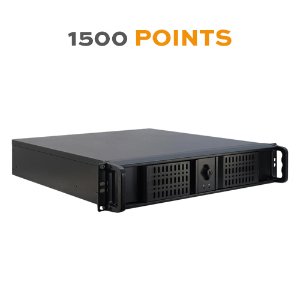
EVOLUTION BMS-1500 Server 19-Inch Rack - Multiprotocol (BACnet / MODBUS / KNX / DALI e64) Building Management System
INFORMACIÓN DEL FABRICANTE
| Marka | : EVOLUTION |
| Referans | : 63102-32-04-1500 |
| Aile | : visualizations |
| Renk | : |
| Garanti | : 2 yıl |
| İade izni | : Hayır |
ÜRETİCİ HAKKINDA DAHA FAZLA BİLGİ
| Fiyat grubu | : HW |
| EAN kodu | : 2000000042695 |
| NC/TARIC kodu | : 84715000 |
| Menşe ülke | : ES |
| Net ağırlık | : 12 kg |
| Brüt ağırlık | : 12 kg |
| Uzunluk | : 65 cm |
| Genişlik | : 60 cm |
| Yükseklik | : 21 cm |
ÖZELLİKLER
- ARAYÜZ
- KNX
- İLETİŞİM TÜRÜ
- Kapasitif
- MAKS. KAPASİTİF YÜK
- 140μF
- GÖRSELLEŞTİRME FONKSİYONLARI
- Akıllı ÖlçümAlarm geçmişiAlarmlarDALI, otomatik entegrasyonEposta bildirimiGörselleştirmeHaftalık zaman anahtarıMantık modülüMantık programlama, komut dosyası türüPush bildirimleriRaporlarSahne modülüVeri tabanına girişYıllık zaman anahtarıçok mantığı
- UYGULAMA TÜRÜ
- İnternet uygulaması
- FİZİKSEL DIŞ ARAYÜZLER
- IP
- IP İLETİŞİM PROTOKOLLERİ
- BACnetKNXnet/IPModbusOPC
- NR. DPTS'NİN
- Sınırlı
- DESTEKLER (ÇÖZÜNÜRLÜK)
- Duyarlı, akıllı telefon için optimize edilmişDuyarlı, tabletler için optimize edilmişSabit çözünürlük
- Donanım/Yazılım Formatı
- Sunucu 19 inç raf
- GÖRSELLEŞTİRME
- Görselleştirme türü
- AĞ GEÇİDİ TÜRÜ
- Diğer otobüs sistemleriHVAC ağ geçidi
- HVAC AĞ GEÇİDİ
- LG
- DİĞER OTOBÜS SİSTEMLERİNE GEÇİT
- BACnetModbus
DESCRIPCIÓN
EVOLUTION BMS-1500 Server 19-inch Rack: limited to 1500 data points (all other features are the same as the unlimited version).
Suitable for installations where the data rate to be recorded on disk does not exceed bursts of 100 telegrams per second.
EVOLUTION servers feature a multiprotocol SCADA/BMS system (BACnet / MODBUS / KNX / OPC / DALI) that monitors, visualizes and controls the building's mechanical and electrical equipment, such as HVAC, lighting, blinds, technical alarms, hydraulics, security, energy systems, etc.
It is pre-installed on a Linux operating system with many advanced modules such as SQL queries, database management, advanced logic, logs, etc. Including new responsive HTML5 modules such as smart metering, weekly/yearly scheduler, scenes, charts, alarms, etc. all with very intuitive graphical user interfaces.
Its visualization is one of the most customizable, multi-user/project, with special user rights, multi-lingual and easy-to-use visualizations on the market.
BUYING GUIDE
CUSTOMIZABLE AND RESPONSIVE VISUALIZATION
Its visualization stands out for being one of the most customizable and easy to use, multi-user/project, with special user rights and multilingual.

Among other modules, the most outstanding are the following:
ANNUAL CALENDAR
Very friendly and simple Google Calendar style view, with day, week, month or year view.
Add, modify, or delete individual events, events from a series, or entire series
Add Exceptions and Execution Periods
Assign colors by categories for easy representation
Create scenes as an event list to schedule actions in the calendar
Use the scenes already created in the Scenes Module to schedule your actions


SMART METERING
Create and view different types of meters:
- Energy: Adds process points for active power and active power
- Liquid/Gas: Adds process points for flow and total flow
Add Rates with Price Increases/Decreases Based on Hourly Farms
Main Counters / Sub-Counters
Customize time ranges and compare different periods
Show spend in €,$,... or unit of measurement.

DALI MODULE
Monitors and controls all DALI and ECG groups on Ipas Dali e64 gateways
Automatic configuration: It only requires the IP address and port of e64 IPAS Dali Gateway and you get the "Full DALI Configuration in Seconds"
Create the structure of the building and link Dali gateways, groups or ECGs

SCENE MODULE
Predefined scenes can be easily modified by the user:
- Create, modify a new scene
- Add, Modify Scene Events
- Add Delays Between Events
- Record and Run Scenes from the Interface
Easy Setup
- Add Delays Between Events
- Set Up Scene Triggers
- Configure Process Point Visibility Which users can see it?

LOGIC MODULE
Graphic Editor
- Create logical pages in folder structure, copy/paste logical pages between projects, drag and drop logical blocks onto pages, links between inputs, outputs, and logical blocks
- Most common logic functions: Boolean logic, mathematical logic, comparators, gates, etc.
- Advanced timers: delay, counter, ladder, clock, cyclics, etc.
- Use any logical block and change it using a scripting language (see next page)
Online diagnostics
- Real-time diagnostics by visualizing the values received and sent by each logical block
- Modifies any existing values, propagating the calculated values throughout the logical map. Even offline!
- Sending to fieldbuses (KNX, Modbus, BACnet) the values calculated as a result of received telegrams or manual modifications

GRAPHICS
Comprehensive tool to display historical data easily
It aggregates multiple series on the same chart, allowing the end user to:
- Add, remove, series at will from list of allowed process points
100% configurable UI design
- Lines, Marks, Background, Axes, Tooltips, Range, Series, Offset, Transparencies, etc.
Excellent tool for users to control useful data
Easily navigate and zoom in/out by clicking on the series

USER PERMISSIONS
Assign Users/User Groups to Rights Settings
Configure Module and Component Permissions (Categories):
Allows you to create and assign users with different permissions within the modules and components of the visualization: Allows one user to view a component, another to interact with it, another not to view it
- Scene Control
- Alarm Module
- Annual/Weekly Scheduler
- Smart metering
- Administration of DALI e64
Multi-Project Configuration: each user can manage their own scenes, annual schedules, schedules, alarms, and scenes, independently of the rest.

NODE-NETWORK
Node-RED: Visual programming development tool for the integration of the IoT world in KNX
Very powerful visual programming environment to connect devices, APIs and online services in the IoT ecosystem in a very simple way:
- Easily connect KNX, Modbus, Bacnet, etc. with any IoT device or service with Evolution Nodes
- Integrations with protocols such as MQTT, REST, Websocket, SQL, HTTP, etc.
- Integrations with third-party APIs such as Telegram, PushOver, Sonos, Doorbird, NetAmo, Philips HUE, Google Voice Assistant, etc.
- Optimized to handle multiple concurrent connections in real-time
- It is the largest open source ecosystem that exists in the world (more than 4500 nodes available)
- Open-source standard for data management and processing


APPLICATION EXAMPLES

MORE INFORMATION AT http://evolution.knx-group.com/
GALERÍA
Envíanos tu consulta sobre este producto
Inicia sesión para enviar una consulta.
Inicia sesión para enviar una valoración.
VALORACIONES
Cargando valoraciones…