

MANUFACTURER DEVICE NAME
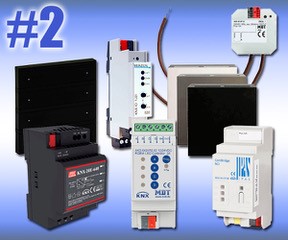
Emergency Kit #2
Producto descatalogado — Este producto está descatalogado por el fabricante; puede no estar disponible o solo bajo pedido.
INFORMACIÓN DEL FABRICANTE
| Marka | : FUTURASMUS |
| Referans | : FUTUKIT02 |
| Aile | : training |
| Renk | : |
| Garanti | : 2 yıl |
| İade izni | : Hayır |
ÜRETİCİ HAKKINDA DAHA FAZLA BİLGİ
| Fiyat grubu | : KIT2 |
| Menşe ülke | : ES |
| Brüt ağırlık | : 4 g |
| Uzunluk | : 5,1 cm |
| Genişlik | : 5,1 cm |
| Yükseklik | : 5,1 cm |
ÖZELLİKLER
- TOLERE EDİLMİŞ AKIM
- 16A
DESCRIPCIÓN
Includes all necessary devices for controlling lightning, RGB dimming, shutters and temperature controlling.
We have prepared this "KNX Emergency kits" at an extraordinary price.
The following functions can be realized with this kit and is therefore perfect to train yourself and test them with the Evolution Visualization/SCADA:
KNX System
- 640mA Power Supply - supplies power to the KNX components.
- KNXnet/IP interface - includes 5 Tunnelling and one object server connection.
- 5 Tunnel connections - to program the KNX bus with the ETS
- Object server or one of the tunnels - servers as the KNX connection with the Evolution VM-Trainer server.
Illumination control
- ON/OFF
- Push buttons - Any of the 8 rockers of the Oria push button, can be used to toggle or switch the lights on/off.
- Actuator - MDT actuator can be configured for switching 1 lighting circuit.
- Dimming
- Push buttons - Any of the 8 rockers of the Oria push button, can be used to switch and dim the lights.
- Actuator - The LED dimmer can switch and dim RGBW LED stripes.
Blinds
- Push buttons - Any of the 8 rockers of the Oria push button, can be used to move the blinds.
- Actuator - Weinzierl actuator can be configured to have one blind channel to move the blind and adjust the slats. Binary inputs can be configured to control any desired function on your KNX project.
HVAC
- Climate control
- The temperature and humidity sensor will provide you the values for your visualization, for example using them on your Evolution Visualization / SCADA.
GALERÍA
Envíanos tu consulta sobre este producto
Inicia sesión para enviar una consulta.
Inicia sesión para enviar una valoración.
VALORACIONES
Cargando valoraciones…